
DJI Modify Flagship Permanent
by DJIModify is DJI's first intelligent 3D model editing software, designed for simplicity, intuitiveness, and efficiency.
- Installment Payment You can pay in installments using Visa, Visa Premium, Maestro, MasterCard, Diners credit cards. The fee is 5% over the quoted price, and it is assigned to your purchase order in your shopping cart upon the selection of the methods of payment. For more details, please click on the link containing The Methods of Payment.
- Fast Delivery For all the purchase orders within Croatia received by 02:00 p.m. on a working day, delivery will be made on the following working day*. On the territory of Europe, we provide a fast delivery service. For more details, please click on the link containing The Delivery Terms.
- International Purchasing The companies within the EU (except for the Republic of Croatia) with a valid VAT ID number, will pay the price exclusive of VAT. The price will be calculated upon checkout. All the customers outside of the EU will pay the export price exclusive of VAT.
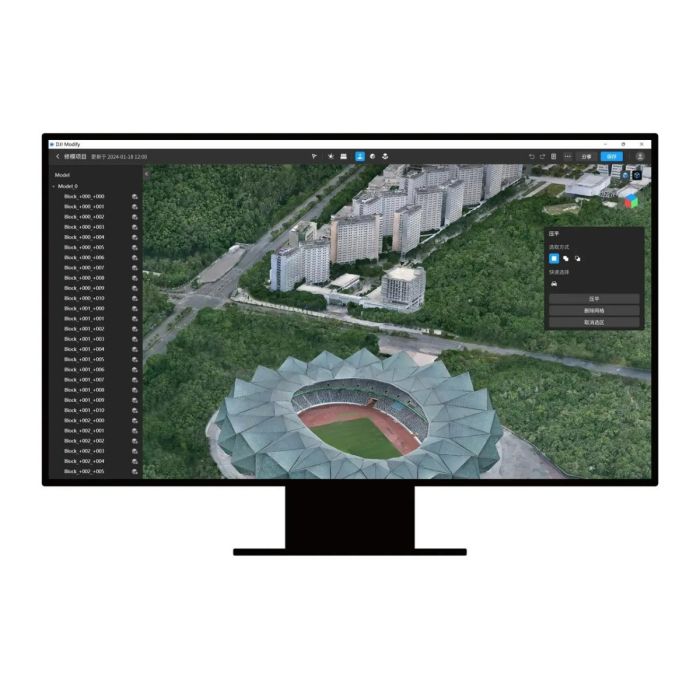
Modify is DJI's first intelligent 3D model editing software, designed for simplicity, intuitiveness, and efficiency. It enables rapid point cloud smoothing, noise reduction, downsampling, and classification, with one-click adjustment of point cloud categories and automatic generation of terrain results. The software accurately identifies and repairs 3D mesh defects—such as floating objects, holes, and vehicles—with a single click, efficiently producing realistic textures.
When integrated with DJI's enterprise drones and DJI Terra, Modify provides a comprehensive, one-stop solution for aerial surveying, modeling, model editing, and sharing. This workflow is tailored for industries such as surveying and mapping, firefighting, emergency response, and transportation.
- Seamless workflow: DJI Modify can work with DJI Terra in a seamless workflow. In a DJI Terra modeling project, you can launch DJI Modify with one click for model editing. This achieves an efficient workflow between DJI Terra and DJI Modify.
- Streamlined interaction: Without the need for complex settings, DJI Modify supports fast import and export of model files and batch editing of multiple models, significantly reducing the model editing workload.
- Efficient 3D Point Cloud Repair: DJI Modify supports point cloud smoothing, noise reduction, downsampling, and classification. Point cloud categories can be adjusted with one click, and terrain results are generated automatically.
- Efficient 3D Model Repair: DJI Modify supports various editing functions such as floating parts removal, surface flattening, texture repair, hole fill, and water surface repair, providing well-edited models at high efficiency.
- Quick Delivery: DJI Modify allows you to export multiple mesh model formats such as PLY, OBJ, and B3DM, as well as various point cloud formats including LAS, PNTS, PLY, PCD, and S3MB in one go. In addition, processed 3D mesh models can be quickly shared to the cloud.
- Authorization Mode: Online authorization is supported.
Notes:
- System requirements: Windows 10 or above (64-bit), 32 GB of RAM, and an NVIDIA graphics card with at least 4 GB of GPU memory and compute capability 6.1 or above.
- DJI Modify can edit only 3D visible light mesh models that are reconstructed by using DJI Terra V4.0.0 or later.
| Feature | Flagship |
| 3D Mesh Editing | √ |
| Point Cloud Editing | √ |
| Terrain Result Generatiom | √ |
| Cloud Sharing | √ |
| Export Results | √ |
| Blind Device | 1 device |
| Authorization Mode | Online |
| Validity Period | Permanent |